> For the complete documentation index, see [llms.txt](https://docs.pagerly.io/llms.txt). Markdown versions of documentation pages are available by appending `.md` to page URLs; this page is available as [Markdown](https://docs.pagerly.io/slack-features/post-rotation-updates-to-slack-channels-and-channel-topic.md).
# Post Rotation Updates to Slack Channels & Channel Topic
Pagerly keeps your entire team informed by automatically posting rotation changes to Slack channels and updating the channel topic with the latest on-call information. No more guessing who’s on-call or digging into schedules — the answer is always visible where your team works.
#### What Pagerly Can Do with Slack Channels
📢 **Automatically Post Rotation Change Notifications**
* Post updates to any Slack channel(s) whenever On-call rotation changes.\
Messages clearly show:
* Who is currently on-call
* Shift duration and timing
* Team or rotation name
* Keeps everyone aligned without manual announcements.
* Add Custom Context Messages like runbook or any doc or anything
📝 **Auto-Update Slack Channel Topic**
* Pagerly can automatically update the Slack channel topic to reflect:
* Current on-call user(s)
* Rotation name
* Escalation or backup info (optional)
### Team Settings
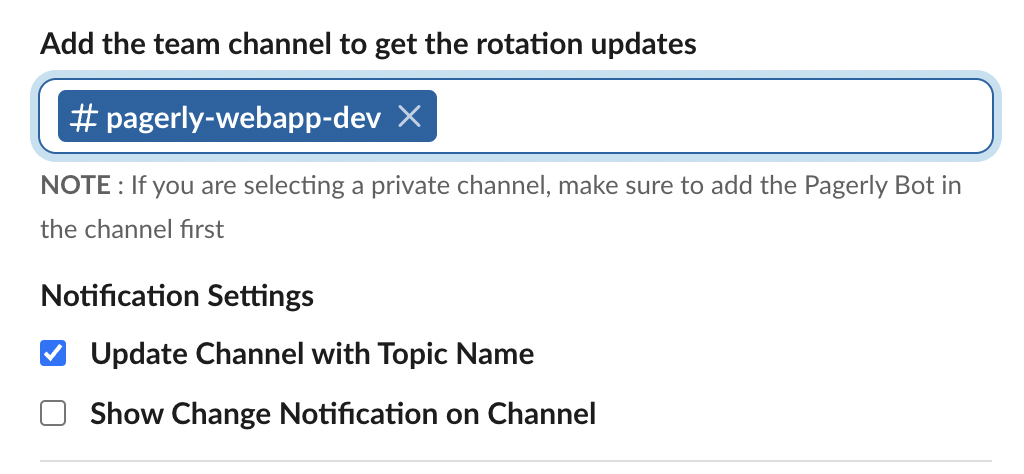
#### T**eam Channel(s)**
The slack channel which would subscribe for any oncall handover / oncall rotation change. On any change in oncall rotation, you would receive 2 notifications on this slack channel
* **Channel Topic Update** : Your slack channel topic would be automatically updated with the current oncall.\
It would look something like this 👇🏻
* **Channel Message** : Your channel would receive a notification on the oncall change
([Customize Notification Here](https://docs.pagerly.io/how-to-work-with-pagerly/custom-change-notification-on-slack))👇🏻
#### **Notification && Topic Setting**s
You can choose to receive if you want to receive notifications on oncall/rotation change as well topic updates.
* Update Channel with Topic Name -> If you want your channel topic to be updated with latest oncall
* Show Change Notification on Channel -> If you want to receive the Notification whenever there is a change in oncall / rotation ([Customize Notification Here](https://docs.pagerly.io/how-to-work-with-pagerly/custom-change-notification-on-slack))