> For the complete documentation index, see [llms.txt](https://docs.pagerly.io/llms.txt). Markdown versions of documentation pages are available by appending `.md` to page URLs; this page is available as [Markdown](https://docs.pagerly.io/oncall-and-rotations/sync-pagerduty-opsgenie-datadog-oncall-usergroup.md).
# Sync Pagerduty / Opsgenie/ Datadog Oncall Usergroup
Pagerly turns **Slack usergroups (like @**oncall / @support**) into the single source of truth** for rotation ownership. Instead of manually updating groups or relying on external schedulers, Pagerly automatically keeps your Slack usergroups in sync with real-time rotations and overrides.
#### What Pagerly Can Do with Slack Usergroups
**🔁 Automatically Sync Rotations to `@oncall`**
* Link any rotation or schedule to a Slack usergroup.
* Pagerly updates the usergroup instantly as rotations change.
* No manual adds/removes, ever.
**👤 Support Permanent Usergroup Members**
* Add **always-on members** to a usergroup (e.g. managers, SRE leads, escalation contacts).
* Permanent members stay in the usergroup **even when they’re not part of the current rotation**.
* On-call users are added and removed dynamically on top of these permanent members.
***
### Go To Edit Team and Add/Update the Usergroup
### Usergroup Sync (Custom @on-call Mentions)
Pagerly lets you map any rotation or on-call schedule to a **Slack usergroup**, so your team can use a clean, familiar mention like `@dev-on-call` instead of `@Pagerly dev-on-call`.
If you already have an existing Slack usergroup, Pagerly can take over managing it automatically. It continuously fetches the **latest rotation and current on-call users**, adds the right people to the usergroup, and removes users who are no longer on rotation ensuring the group always stays accurate.
### Permanent Users in the Usergroup (Optional)
You can also define **permanent members** for a usergroup, such as managers, team leads, or escalation contacts. These users remain in the usergroup at all times, even when they are not part of the current rotation. Pagerly dynamically layers the active rotations / on-call users on top of these permanent members, without disrupting your rotation logic.
{% hint style="danger" %}
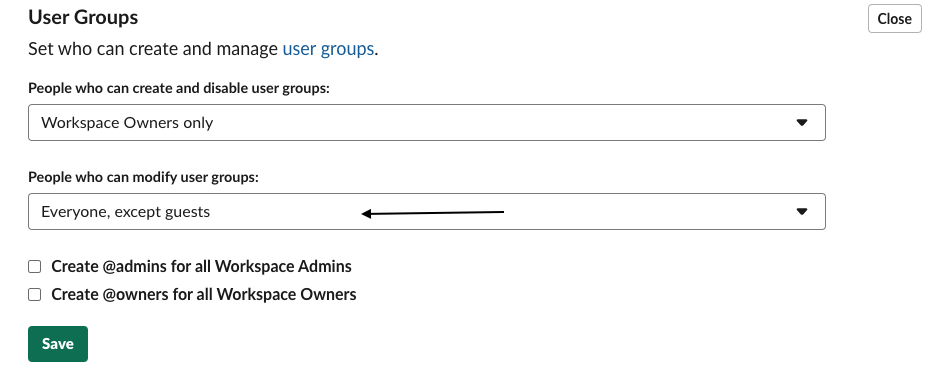
For Usergroup to work : Pagerly App uses Slack's User Group feature to create an @mention for every Please make sure you have it enabled for everyone in the [workspace settings](https://my.slack.com/admin/settings#user_group_restrictions) .
{% endhint %}